Blog

Web Server Problem

We are experiencing a problem with one of our web servers.  The issue was caused by a failed security update. Sites affected by this issue may get an error saying that a required PHP component is not installed.  We are working to resolve this issue. 7:15am

Update 7:31am:  Some sites are back online.  We are still experiencing issues with the server, but on most sites those issues should be unnoticeable.

Update 7:55am:  We have gone through all the sites on the server, and they all seem to be functioning properly.  We are still getting some errors on the server, which we will be working to correct, but in the mean time, all sites are online.
2011-10-25T19:53:41-05:00June 29, 2010|News and Updates|Comments Off on Web Server Problem

Setting up Email on iPhone or iPod Touch

On your iPhone or iPod, tap Mail or from the Home screen choose Settings > Mail > Accounts > Add Account

  1. It will show you a list of email account types.  Click Other
  2. Select a server type — IMAP, POP or Exchange.  We support IMAP or POP.
  3. Enter your account information:
    1. Enter your email address
    2. The email server type (IMAP or POP)
    3. Enter your incoming mail server: pop.internetpro.net for POP or imap.internetpro.net for IMAP
    4. Your username is your entire email address in all small letters
    5. Enter your email password.
    6. Enter your outgoing mail server smtp.internetpro.net
    7. Enter your user name and password for incoming and outgoing servers.  The outgoing server uses the same username and password as the incoming and these are REQUIRED.
2014-01-16T03:10:32-06:00June 29, 2010|Documentation, FAQ|Comments Off on Setting up Email on iPhone or iPod Touch

Setting up a vacation message / auto responder

Go to the Webmail Login at  https://webmail.internetpro.net

Log in with your email address and password and in the drop down box, choose “Tuxedo”. This procedure can be completed on all three choices, but the screenshots below are for the Tuxedo interface.

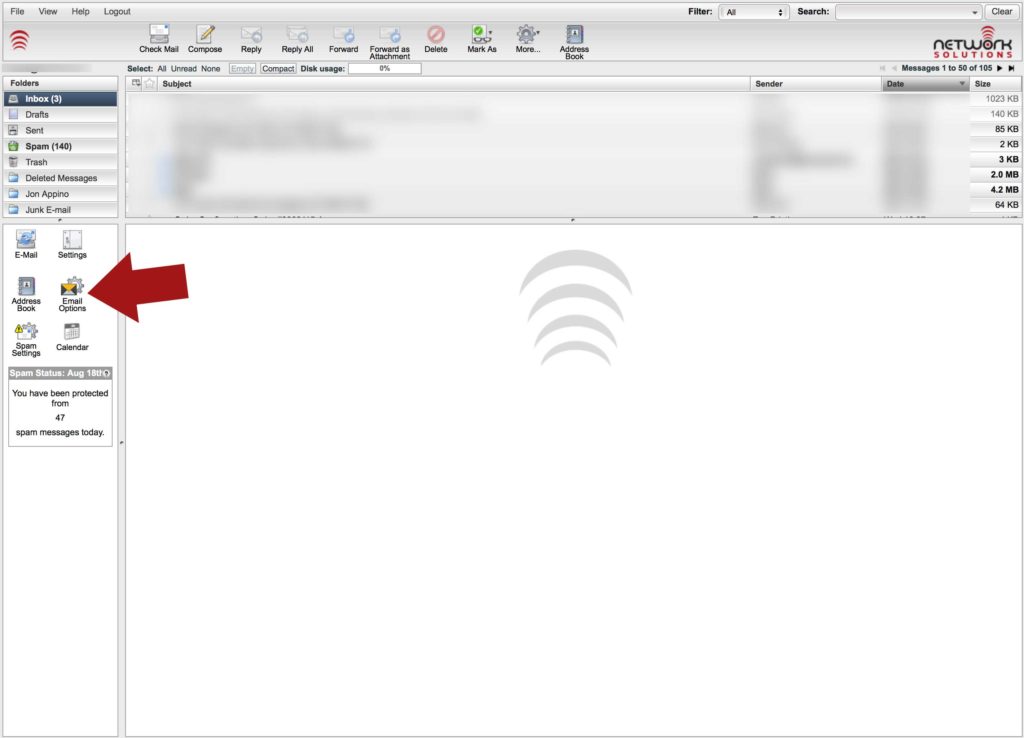
On the left, choose “Email Options” as seen below:

EmailOptions


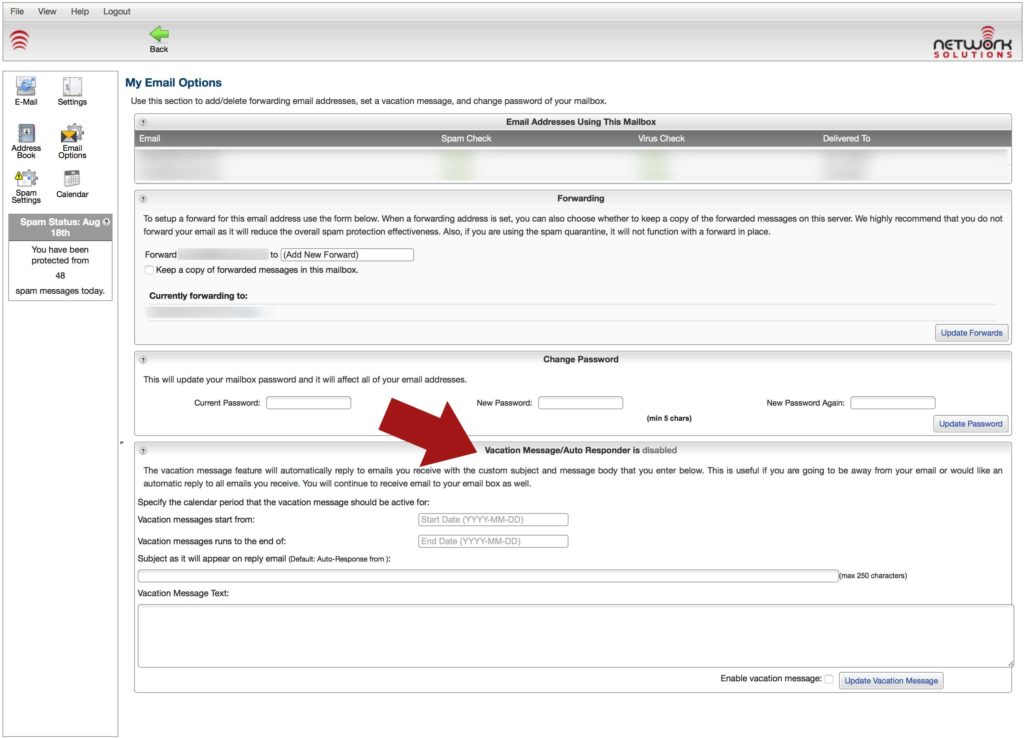
At the bottom of the next page, there is a section called “Vacation Message/Auto Responder” where you can set the start and end dates, enter the subject, and enter the message.  At the bottom is a check mark to enable it. Then, just hit the “Update Vacation Message” button.  See below:

AutoResponder


Thats it!  If you are still having trouble, feel free to send the message you want to apply to support@internetpro.net along with the dates you want it active.  We’ll set it up for you.


2016-08-19T12:41:47-05:00June 25, 2010|Documentation, FAQ|Comments Off on Setting up a vacation message / auto responder

Spam Server Problem

One of our spam servers had an issue overnight. It did not thrown any alarms because the service was “partially” running.  We noticed more spam than usual making it through the system this morning, so we did some checking.  After reviewing the message headers, we determined that the spam getting through was not actually being checked by the system.  Upon further investigation, we found a server malfunctioning.  The issue has been resolved now, so your spam levels should return to normal.

2011-10-25T19:53:49-05:00June 22, 2010|News and Updates|Comments Off on Spam Server Problem

Virtual Private Server Issue

We are presently experiencing issues with one of our virtual server hosts.  We are working on resolving the problem.  Some customers with VPS’s are affected.
Some websites (hosted on virtual servers) are also affected.

We will post updates here. 2:56pm

Update: The problem is stemming from a failure of the shared NAS which hosts the virtual server storage.  Efforts are underway to restore NAS service. 3:39pm

Update: Most VPS are back online.  We are checking all servers individually to make sure they are operating properly. 3:47pm

Update: Looks like all VPS machines are up and accounted for.  We are working on finding cause.  The NAS networking shut down, and that caused the VPS’s to not be able to write to their filesystems.  We are not yet sure why the networking failed on the NAS. 3:54pm

2011-10-25T19:53:57-05:00June 17, 2010|News and Updates|Comments Off on Virtual Private Server Issue

Planned Maintenance

AT&T Network Engineers will be performing a planned maintenance on
Birmingham-Alabama Gigabit Access Router 1. The work will be performed on 7/1/2010,
during the maintenance window of 12:00AM-6:00AM, local time.
AT&T's goal is to successfully complete the task and restore service within the
stated time frame. 

We apologize for any inconvenience that you may experience.
We expect service to be impacted somewhat during the maintenance window.

AT&T Network Engineers will be performing an IOS upgrade.

Please Note: This maintenance is IN ADDITION TO the planned maintenance on 6/18/2010.
The work on 6/18/2010 will be done on Birmingham-Alabama
Gigabit Access Router 3, while this is being done on Router 1. The notice for that
maintenance can be found at https://www.netsolinc.com/planned-maintenance.

Update: The 7/1/2010 maintenance has been rescheduled to 7/6/2010.  The
maintenance window is the same as is the scope of work.

Update: The 7/1/2010 maintenance which was moved to 7/6/2010 has been moved again.
The new maintenance date is 7/9/2010.  The time window and the scope of work
remains the same.

Update: The maintenance was completed.  Service was affected in the expected manner
and we had some degradation of performance from 2:25AM to 3:05AM CDT.
2011-10-25T19:54:06-05:00June 17, 2010|News and Updates|Comments Off on Planned Maintenance

Intrusion Detection Policy

1.0 Overview
This policy provides policies to establish intrusion detection and security monitoring to protect resources and data on the organizational network. It provides guidelines about intrusion detection implementation of the organizational networks and hosts along with associated roles and responsibilities.

2.0 Purpose
This policy is designed both to establish procedures for notification of affected clients in the case of an intrusion event.

3.0 Scope
This policy covers every host on the organizational public network.

4.0 Objectives

  1. Increase the level of security by actively searching for signs of unauthorized intrusion.
  2. Prevent or detect the confidentiality of organizational and client data on the network.
  3. Preserve the integrity of organizational and client data on the network.
  4. Prevent unauthorized use of organizational and client systems.
  5. Keep hosts and network resources available to authorized users.
  6. Increase security by detecting weaknesses in systems and network design early.

5.0 Requirements

  1. All systems accessible from the internet must operate IT approved active intrusion detection software.
  2. All host based and network based intrusion detection systems must be checked on a daily basis at a minimum and their logs reviewed.
  3. All intrusion detection logs must be kept for a minimum or 30 days.

6.0 Notification

  1. Any suspicious or malicious activity reported by a third-party must be investigated and responded to immediately.
  2. Upon completion of investigation and resolution of the issue, the reporting party should be notified of said resolution.

7.0 Responsibilities

  1. The network administration team shall:
    1. Monitor intrusion detection systems both host based and network based.
    2. Check intrusion detection logs daily at a minimum.
    3. Determine approved intrusion detection systems and software.
    4. Act on reported incidents and take action to minimize damage, archive any hostile or unapproved software for investigation, and recommend changes to prevent future incidents..
    5. Notify affected clients as to the extent of intrusion, resolution, and plan for future preventative action.
2011-10-25T19:44:44-05:00June 11, 2010|FAQ|Comments Off on Intrusion Detection Policy

Email Setup on Windows Live Mail

These are the instructions for setting up your Network Solutions, Inc. hosted email if you have Windows Live Mail for your email client.

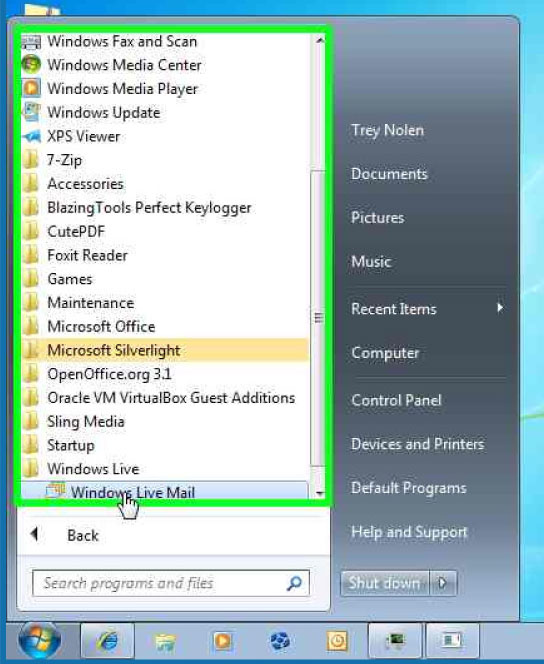
1) Open Windows Live Mail by clicking on the icon.

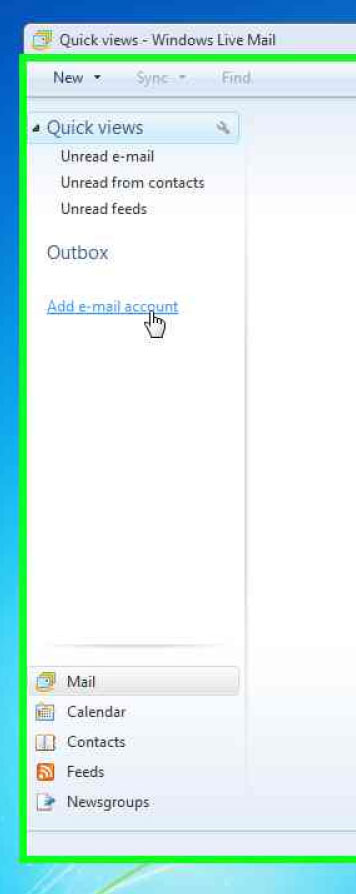
2) On the left side of the screen, click “Add e-mail account”.

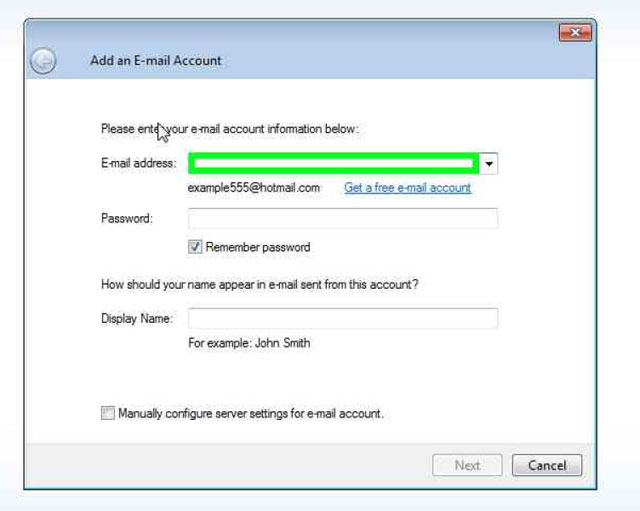
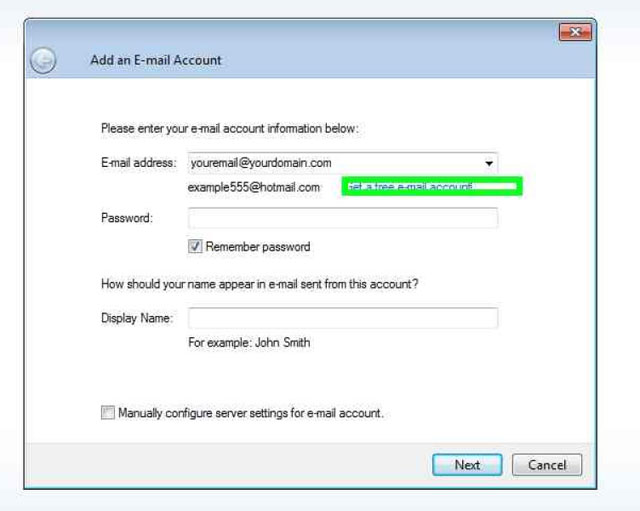
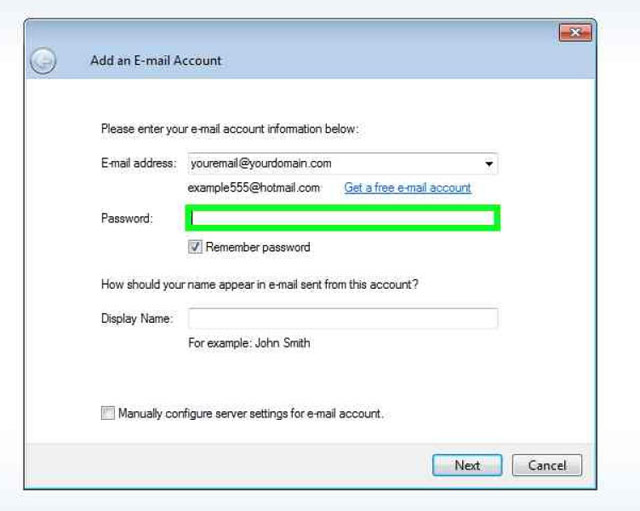
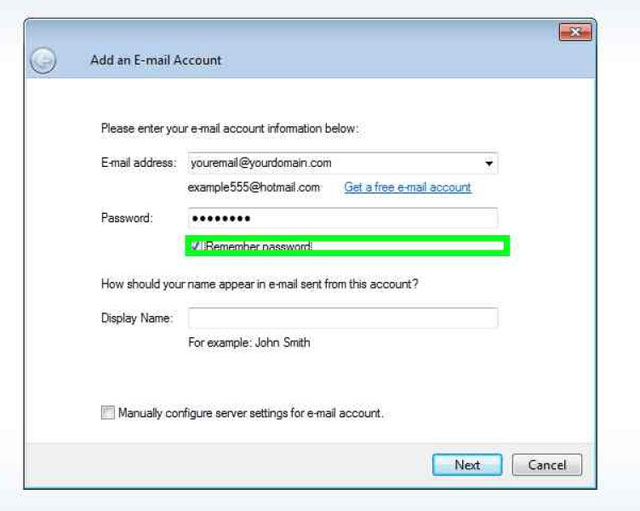
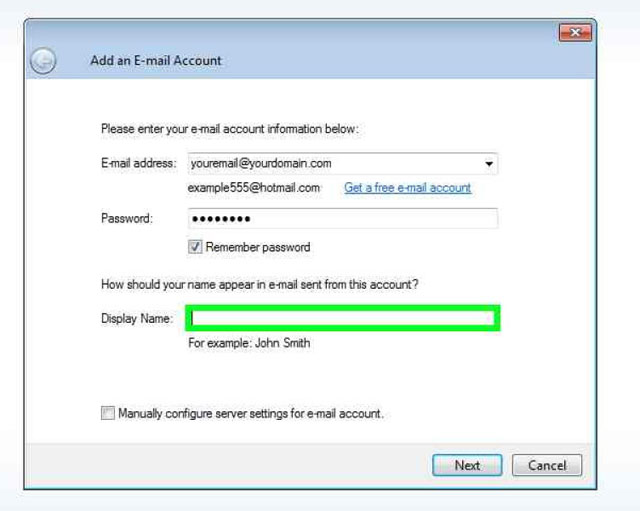
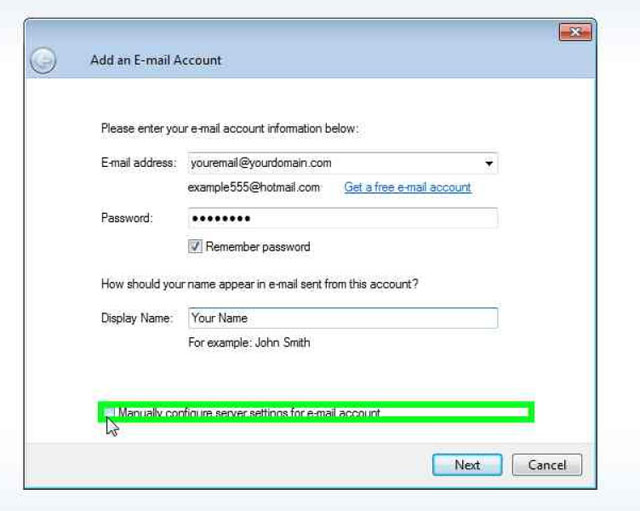
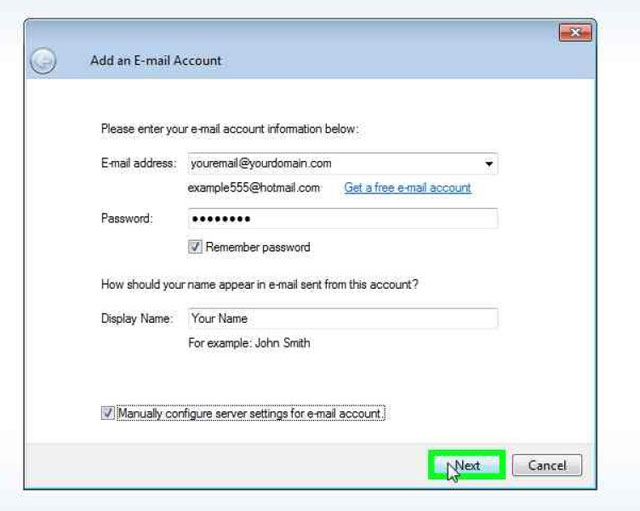
3) Fill in the blanks as shown in the pictures below, substituting your name and email address in the appropriate places.

4) Place a check mark next to “Manually configure server…”

5) Hit Next.

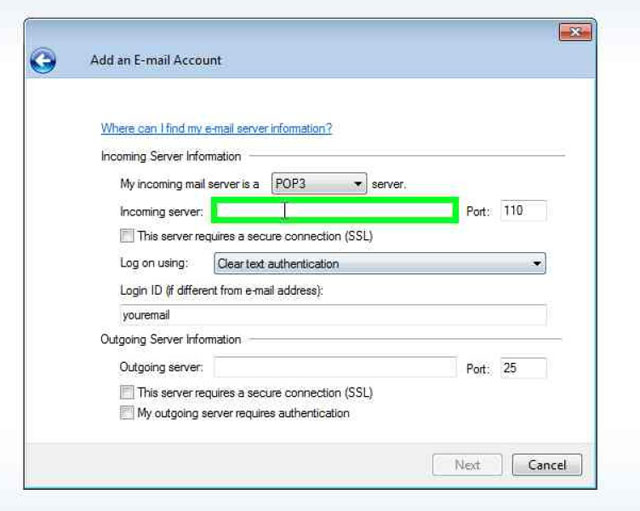
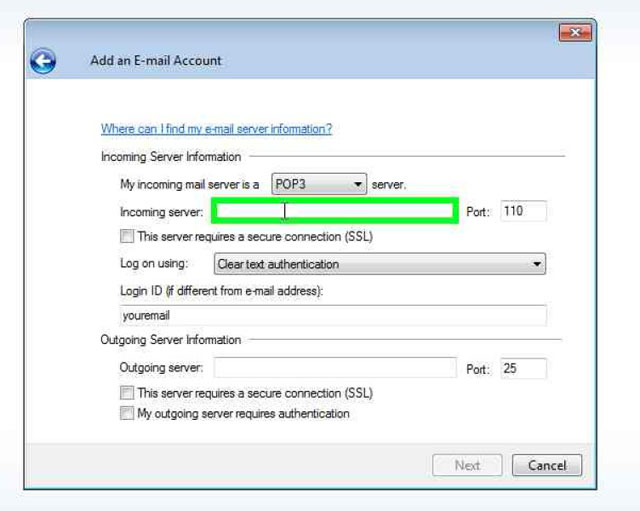
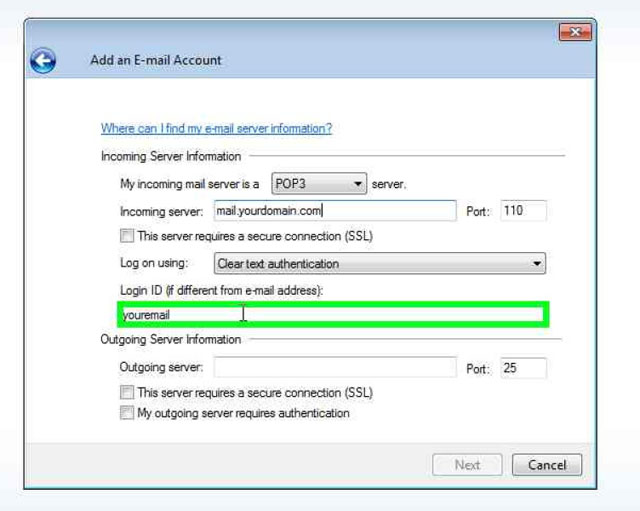
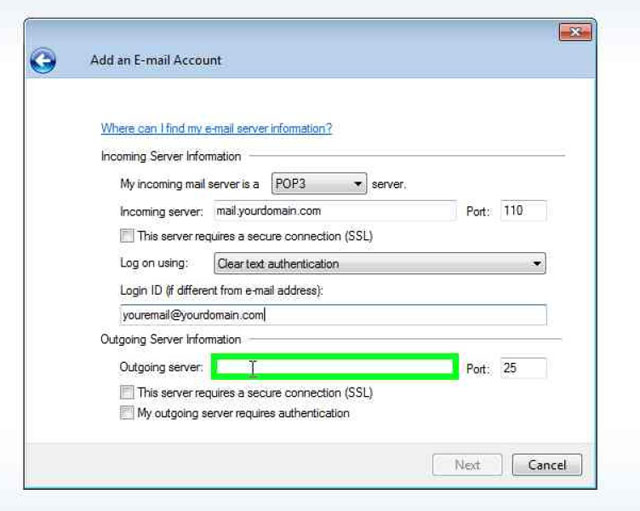
6) Fill in the blanks as shown below, substituting your mail server and email address where appropriate.  In the example, “yourdomain.com” will be substuted for the last part of your email address. For example, if your email address is support@internetpro.net, your mail servers would be mail.internetpro.net.

7) Make sure you change the login ID to match your entire email address. For example, using the above email address, if this blank reads “support”, you would make it “support@internetpro.net” (without quotes).

8 ) Outgoing server will be the same as incoming.

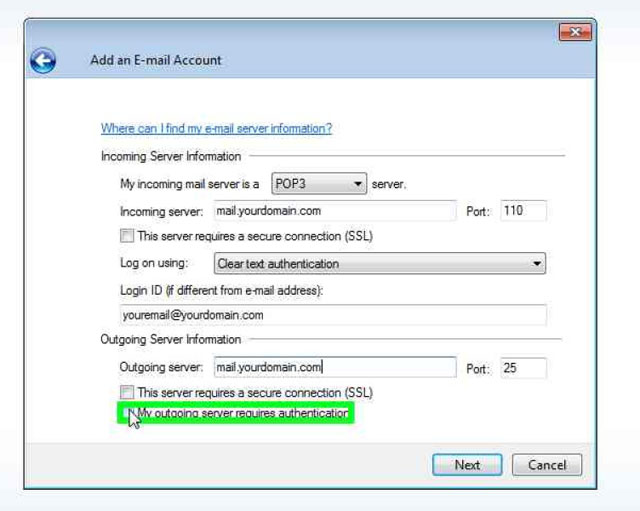
9) Place a check by “My outgoing server requires authentication”.

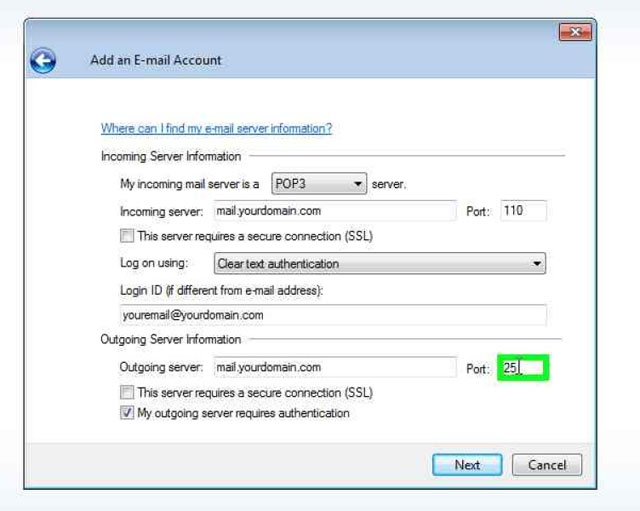
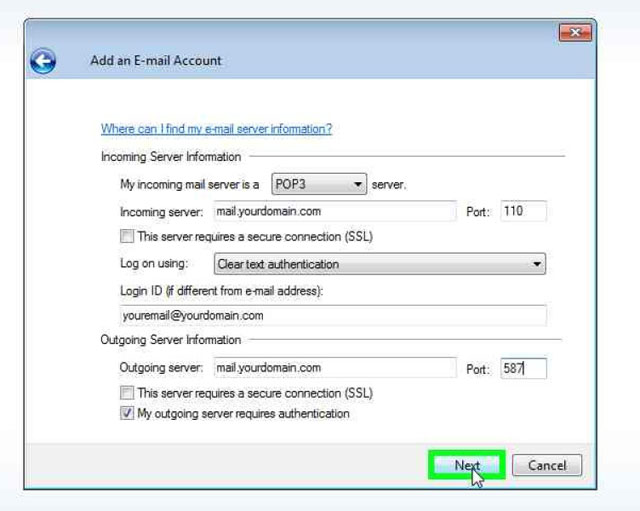
10) Change the 25 in the blank next to Port: to 587.

11) Hit Next.

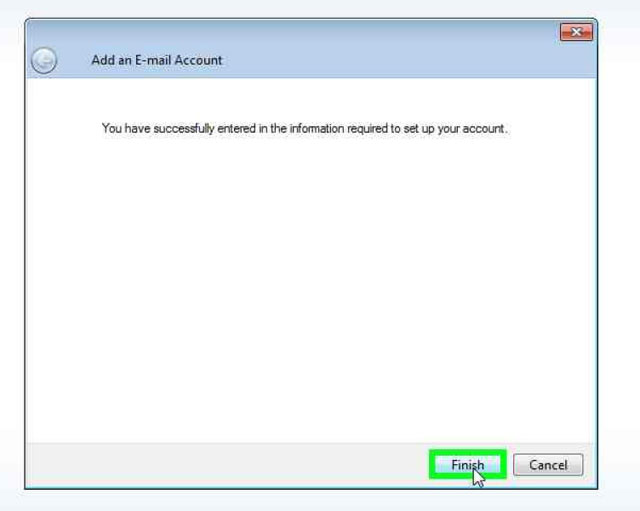
12) Hit Finish.

You’re done!  If you have any questions, please don’t hesitate to contact us at 877-886-6868 or 256-547-6817.

2012-02-24T21:32:21-06:00June 8, 2010|Documentation, FAQ|Comments Off on Email Setup on Windows Live Mail

Privacy Policy

We have created this Privacy Policy to demonstrate our firm commitment to privacy and security. This Privacy Policy describes how Network Solutions, Inc. collects information from all end users of Network Solutions’ services (the “Services”)–those who access some of our Services but do not have accounts (“Visitors”) as well as those who pay a monthly service fee to subscribe to the Service (“Members”)–what we do with the information we collect, and the choices Visitors and Members have concerning the collection and use of such information. Network Solutions requests that you read this Privacy Policy carefully.

Personal Information Network Solutions, Inc. Collects and How It Is Used

Introduction – Network Solutions collects information in different ways from Visitors and Members who access the various parts of our Services and the network of web sites accessible through our Service. We use this information primarily to provide a customized experience as you use our Services and, generally, do not share this information with third parties. However, we may disclose personal information collected if we have received your permission beforehand or in very special circumstances, such as when we believe that such disclosure is required by law or other special cases described below.

Registration – Members are asked to provide certain personal information when they sign up for our Services, including such information as name, address, telephone number, billing information (such as a credit card number), and/or the type of personal computer being used to access the Services. The personal information collected from Members during the registration process is used to manage each Member’s account (such as for billing purposes). This information is not shared with third parties, unless specifically stated otherwise or in special circumstances.

Online Shopping – At some web sites, you can purchase products and services or register to receive materials, such as a catalog or new product and service updates. In many cases, you may be asked to provide contact information, such as your name, address, email address, phone number, and credit/debit card information. If you complete an order for someone else, such as an online gift order sent directly to a recipient, you may be asked to provide information about the recipient, such as the recipient’s name, address, and phone number. Network Solutions has no control over the third parties’ use of any personal information you provide when placing such an order. Please exercise care when doing so.

If you order products directly from Network Solutions, such as through the “Network Solutions Store,” we will use the personal information you provide only to process that order. We do not share this information with outside parties except to the extent necessary to complete that order.

Responses to Email Inquiries – When Visitors or Members send email inquiries to Network Solutions, the return email address is used to answer the email inquiry we receive. Network Solutions does not use the return email address for any other purpose and does not share the return email address with any third party.

Special Cases – It is Network Solutions’s policy not to use or share the personal information about Visitors or Members in ways unrelated to the ones described above without also providing you an opportunity to opt out or otherwise prohibit such unrelated uses. However, Network Solutions may disclose personal information about Visitors or Members, or information regarding your use of the Services or web sites accessible through our Services, for any reason if, in our sole discretion, we believe that it is reasonable to do so, including: to satisfy laws, such as the Electronic Communications Privacy Act, regulations, or governmental or legal requests for such information; to disclose information that is necessary to identify, contact, or bring legal action against someone who may be violating our service agreement or other user policies; to operate the Services properly; or to protect Network Solutions and our Members.

“Cookies” and How Network Solutions Uses Them – A “cookie” is a small data file that can be placed on your hard drive when you visit certain web sites. Network Solutions may use cookies to collect, store, and sometimes track information for statistical purposes to improve the products and services we provide and to manage our telecommunications networks. If you are a Member and have created your own Personal Start Page, we will use a cookie to save your settings and to provide customizable and personalized services. These cookies do not enable third parties to access any of your customer information. Additionally, be aware that if you visit non-Network Solutions web sites where you are prompted to log in or that are customizable, you may be required to accept cookies.

Advertisers and partners may also use their own cookies. We do not control use of these cookies and expressly disclaim responsibility for information collected through them.

Network Solutions’s Commitment to Children’s Privacy – Protecting children’s privacy is especially important to us. It is our policy to comply with the Children’s Online Privacy Protection Act of 1998 and all other applicable laws.

Network Solutions recommends that children ask a parent for permission before sending personal information to Network Solutions, or to anyone else online.

Public Forums – Please remember that any information you may disclose in on a Member web page, or other public areas of our web sites or the Internet, becomes public information. You should exercise caution when deciding to disclose personal information in these public areas.

Network Solutions’ Commitment to Data Security – Services and web sites we sponsor have security measures in place to protect the loss, misuse, and alteration of the information under our control. While we make every effort to ensure the integrity and security of our network and systems, we cannot guarantee that our security measures will prevent third-party entities from illegally obtaining this information.

Where to Direct Questions About Network Solutions’ Privacy Policy – If you have any questions about this Privacy Policy or the practices described herein, you may contact:
Network Solutions, Inc.
226 South 5th St.
Gadsden, Alabama 35901
support@internetpro.net

Revisions to This Policy Network Solutions – reserves the right to revise, amend, or modify this policy, our Dial-up Internet Service Agreement and our other policies and agreements at any time and in any manner. Notice of any revision, amendment, or modification will be posted in the News and Updates section of our website.

2013-02-25T20:14:23-06:00June 7, 2010|FAQ|Comments Off on Privacy Policy

Regional DSL Outage

AT&T tells us that they are having an outage of some kind.  Customers have line sync, but are not able to authenticate.

AT&T expects service to be restored by midnight tonight.

2011-10-25T19:54:17-05:00June 4, 2010|News and Updates|Comments Off on Regional DSL Outage
Go to Top