Blog

Planned Maintenance

AT&T Network Engineers will be performing a planned maintenance on Birmingham-Alabama
Access Router 1. The work will be performed on 11/18/2010, during the maintenance
window of 12:00AM-6:00AM, local time. AT&T's goal is to successfully complete the
task and restore service within the stated time frame.

We apologize for any inconvenience that you may experience.
We expect service to be impacted somewhat during the maintenance window.

AT&T Engineers will be performing an IOS upgrade.
2011-10-25T19:52:11-05:00November 3, 2010|News and Updates|Comments Off on Planned Maintenance

Planned Maintenance

AT&T Network Engineers will be performing a planned maintenance on
Birmingham-Alabama Access Router 1. The work will be performed on 10/5/2010,
during the maintenance window of 12:00AM-6:00AM, local time. AT&T's goal is
to successfully complete the task and restore service within the stated time frame. 

We apologize for any inconvenience that you may experience.
We expect service to be impacted somewhat during the maintenance window.

AT&T Network Engineers will be performing a router reload.
2011-10-25T19:52:26-05:00September 21, 2010|News and Updates|Comments Off on Planned Maintenance

Internet Outage

Sept 3, 2010 – We are experiencing an outage that started at 4:00pm.  We are working with AT&T on a resolution.  The ticket is currently in the testing stages and we do not know what the upstream issue is.   The problem is definitely outside our network, and we are waiting on news from the upstream providers in order to get an estimated time to repair.

Update 7:50 pm.  Looks like everything is back up. AT&T has still not informed us of what the problem was, but because of the Labor Day weekend they were slower than usual in their response.  We are working on adding an additional provider to add more redundancy since we cannot count on them.

Sept 4, 2010 – AT&T never did contact us about the resolution to the problem and they automatically closed their ticket.  However, this morning we are continuing to experience issues related to this problem.   As of 8:50am, most sites/services are being impacted.  We have re-opened a ticket with AT&T and are hoping they will work on this in a timely manner, but right now it does not seem like they want to work on a holiday weekend.

Update 11:25am  – Finally got some needed info from AT&T.  They have a major fiber cut between Anniston and Talladega due to construction work.   Estimated Time to Repair is 1:00pm CDT.   This issue is affecting a large area.

Update 11:31am – Well, that was quick.  They just told us 1:00, but everything just came online.

2011-10-25T19:52:33-05:00September 4, 2010|News and Updates|Comments Off on Internet Outage

Upgraded Alternate Webmail

We have upgraded our alternate webmail interface.   Our alternate interface can be found at https://webmail.internetpro.net.   We have just upgraded it to the newest version available.  This interface includes several advantages over our traditional interface, including an HTML editor and drag-and-drop ability using AJAX.   However, the alternate interface is not integrated into your email settings or your server-side filtering.  Feel free to try out either interface to see which one suits your needs better.

Update: We have added a button on our home page under the Online Email Center which links to the alternate interface. We hope you enjoy it.

2011-10-25T19:52:40-05:00September 2, 2010|News and Updates|Comments Off on Upgraded Alternate Webmail

Phone System Issue

As of 9:50am, our phones have gone out and we are unable to make outgoing calls or receive incoming calls. We are working with our telco provider to resolve the issue. If you have an immediate need, please email us at support@internetpro.net with a callback number.

10:20am – Our phone system is back online and we do not anticipate any additional issues.

2011-10-25T19:52:48-05:00August 31, 2010|News and Updates|Comments Off on Phone System Issue

Setting up Email on iPad

The iPad’s Mail App works with MobileMe, Microsoft Exchange, Yahoo! Mail, Gmail, AOL and other IMAP and POP3 email services. Once you have added one of these accounts to your iPad you will be able to send and receive photos, PDF’s, and other attachment types.  These instructions show you how to set up an email address which is hosted by Network Solutions, Inc.   Our email servers support both IMAP and POP3.


Setting Up Initial Email Account on the iPad

The following tutorial assumes you have never added an email account to your iPad.

Add Email Account to iPad

1. Tap on Mail.

how to add email account to ipad 12 225x300 How to Setup Email Accounts on the iPad

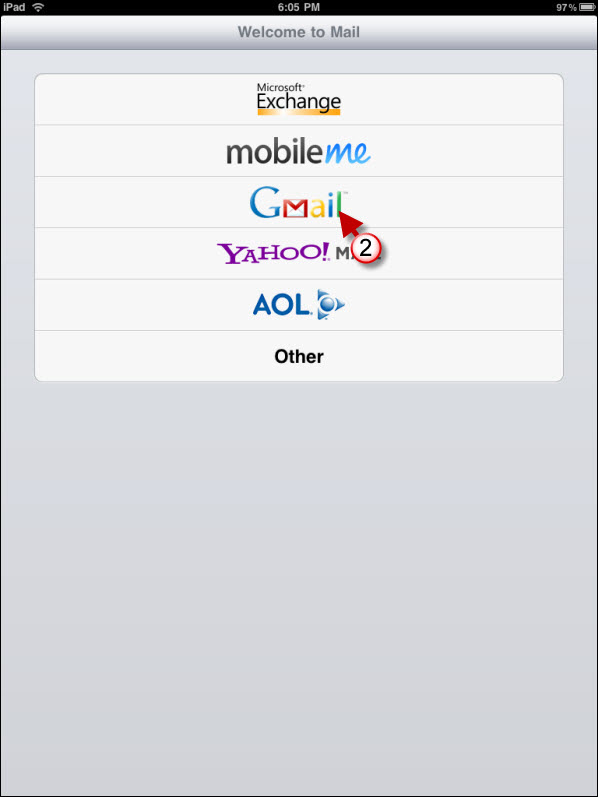
2. For the account type, choose “Other”

how to add email account to ipad 31 225x300 How to Setup Email Accounts on the iPad

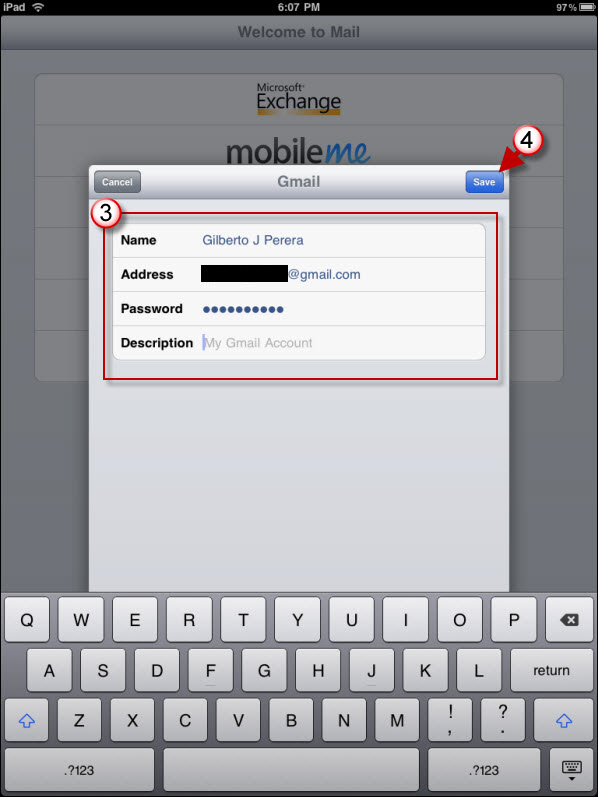
3. Enter your account information.  Your account name will be your entire email address in all lower case.   You can use either POP3 or IMAP for the account type.  See the page at https://www.netsolinc.com/email-settings-2 for the server settings of each type.   Please note that on Apple devices, it will indicate that the username and password for the outgoing (SMTP) server is Optional.  It is NOT optional on our servers if you want to send email.  Please fill out those blanks with the same credentials as you used for the incoming server.


4. Tap Save

Add more email accounts in iPad

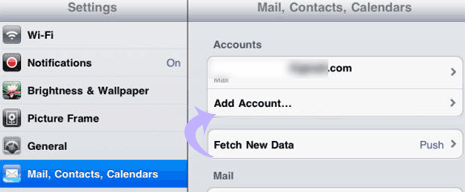
1. Tap ‘Settings’ icon on iPad home screen.

2. Then tap ‘Mail, Contacts, Calendar’ option in the left column.

3. Select ‘Add account’ option under ‘Account’ listing at the top of right column.

4. Follow the instructions for adding initial account above.

2014-12-17T22:52:58-06:00August 11, 2010|Documentation, FAQ|Comments Off on Setting up Email on iPad

Planned Maintenance

We are replacing some hardware that is about to fail in one of our web servers.  The server will go down for a short time and will affect some web hosting customers.  The downtime should be very short, and this is a necessary replacement to keep the server from failing later.  – 10:20pm

Server back online at 10:28.  We have tested it and all sites look OK.  Eight minutes downtime.

2011-10-25T19:53:18-05:00July 28, 2010|News and Updates|Comments Off on Planned Maintenance

Internet Outage

At 4:22pm we experienced an outage of our primary circuit. It is an upstream outage and seems to be causing issues with Verizon phones and multiple carriers as well.  We are working with upstream providers on a resolution.

5:19pm – The issue is a major fiber cut between Birmingham and Talladega.  There is no current estimated time to repair.

10:15pm – Estimated Time to Repair is now 3:00am.  AT&T has identified two problems — the fiber cut and a hardware issue caused by the bouncing circuit.  If they fix either one or the two, our circuits should normalize.

3:25am – Service seems to be fully restored.  Some networks/carriers still affected by the issue, and complete restoration of all fiber is now estimated to be repaired by 4:00am CDT.

Don’t forget:  You can follow updates such as these on Twitter by following @netsolinc.

2011-10-25T19:53:26-05:00July 21, 2010|News and Updates|Comments Off on Internet Outage

Wireless Internet Issue

One of our wireless base units is experiencing a problem.  This is only affecting a few customers.  The first issue was reported at 4:27pm and was “fixed” at 4:43pm, but the unit is continuing to fail.  We are in the process of diagnosing the problem and rerouting affected customers to our redundant wireless base units. It is currently 6:15pm.

All customers are have been successfully rerouted to redundant systems.  The primary system is currently operational as well, but we will be testing it to find the issue causing the sporadic malfunction. 6:30pm

2011-10-25T19:53:33-05:00July 18, 2010|News and Updates|Comments Off on Wireless Internet Issue

Recommended DNS Settings

The Domain Name System (DNS) is the “phone book” of the internet.  Computers don’t understand web addresses like https://www.netsolinc.com.  They understand IP addresses.  In the same way that you use a phone book to retrieve a phone number by a person’s name, DNS changes web addresses into IP addresses. For instance, https://www.netsolinc.com gets changed to http://74.252.14.254.

The speed of your internet experience can be greatly influenced by DNS.  If your computer is taking a long time to look up names, then sites will load slower. Most pages will reference many addresses, and each of those addresses will need to be checked with DNS.  If DNS is slow, then each of those checks contributes to a slower page load.  For years, we at Network Solutions, Inc. have been utilizing a free service called OpenDNS.  OpenDNS is a company which provides free, fast, and reliable DNS.  They have some premium offerings as well, which can let you customize your internet experience.   The addresses of their servers are 208.67.222.222 and 208.67.220.220.  All you have to do to take advantage of their speed and reliability is use those numbers for your DNS servers.

Since the Domain Name System is basically your link to finding sites on the internet, it can also be used to filter bad sites.  OpenDNS also offers a free service call Family Shield.  To utilize this service, all you do is use 208.67.222.123 and 208.67.220.123 as your DNS servers.  Using those servers, sites with adult content, anonymizers, and phishing get automatically blocked.   Using this service, you can worry a lot less about what content your child is viewing on the internet.


We hope these suggestions can bring better performance and/or a safer internet experience for you and your computer.

2012-11-14T15:34:40-06:00July 15, 2010|Documentation, FAQ|Comments Off on Recommended DNS Settings
Go to Top