Blog

Planned Maintenance

AT&T Network Engineers will be performing a planned maintenance on
Birmingham-Alabama Gigabit Access Router 3. The work will be performed on 6/18/2010,
during the maintenance window of 12:00AM-6:00AM, local time.
AT&T's goal is to successfully complete the task and restore service within the
stated time frame. 

We apologize for any inconvenience that you may experience.
We expect service to be impacted somewhat during the maintenance window.

AT&T Network Engineers will be performing an IOS upgrade.
2011-10-25T19:54:27-05:00June 4, 2010|News and Updates|Comments Off on Planned Maintenance

New Web Page Launched

We launched a new version of our web site!  Much of the information and functionality is the same, but we are updating the “look”.   Also, the new site is built on WordPress technology, which allows easy and quick updates of the site.   We are also tying the site in with Twitter.  You can follow us @netsolinc.   We will post updates of new products, specials, or events that may affect your service.  We hope you enjoy the new look and your feedback is welcomed.  If you have any issues with the site, please let us know!

2011-10-25T19:54:37-05:00June 2, 2010|News and Updates|Comments Off on New Web Page Launched

Host Down

We have one host down in our offsite datacenter.  It looks like a connectivity problem with the datacenter rather than a host issue.  We are working to resolve the issue.

Update 6:48pm – We have confirmed that it is yet another problem with a Cisco switch.  Datacenter engineers are working with Cisco now to resolve the issue.  Network connectivity has been intermittent since 6:37pm.

Update 8:40pm – Switching has been relatively stable for the last hour or so, but the datacenter engineers are continuing to research and diagnose the issue with Cisco TAC.

Update – Cisco identified a software bug.  They have applied updates to the equipment and the network is stable now.

Post Incident Report
Date / Time of Incident: 6/1/2010 6:44PM ET
Duration of Incident: 1hour 13minutes
Scope of Incident: Newark, Delaware Data Center Dedicated, Colocated and Cloud Customers

Description of Incident:
At 6:44PM ET one of the two redundant Cisco 6509 switches supporting the Dedicated, Colocated and Cloud Customers failed.  The second switch failed in the same manner when load from the first switch was re-routed to the second.  The end result was loss of connectivity for approximately 40 minutes.  As the switches recovered, latency lasted another 33 minutes.

Actions During Incident:
6:44 PM  - Network Operations and Network Engineering were immediately dispatched to investigate and resolve the issue.  A ticket was opened with the vendor of the switches (Cisco) and efforts to restore service were coordinated between the datacenter and Cisco.  

6:55 PM - After exhausting normal troubleshooting avenues, the Switch 1 is reloaded at console by Network Engineers

6:58 PM – Switch 2 primary supervisor engine fails to boot, secondary supervisor engine becomes active

7:03 PM – Switch 1 completes rebooting , routing protocols established, datacenter team monitors performance of switch

7:08 PM – Switch 2 Primary supervisor engine is manually reset, secondary supervisor engine becomes fully active

7:12 PM – Switch 1 primary supervisor engine fails, secondary supervisor begins to take over

7:20 PM – Switch 1 secondary supervisor takes over

7:37 PM – Switch 1 Primary supervisor engine pulled, engineers suspect faulty hardware

7:48 PM – Switch 2 Secondary Supervisor engine completes booting, begins forwarding traffic.  CPU on both switches remain elevated for 10 minutes while routing protocols are re-established

7:58 PM – Forwarding returns to normal, data delivered to Cisco for further analysis

Root Cause of Incident:
Cisco has identified a specific bug as the likely root cause that created a memory leak which triggered the event.  Still awaiting final confirmation from Cisco on the bug, but initial findings indicate software issues as the root.

Further Actions:
Based on an expected confirmation from Cisco on the bug, a software patch will be applied in a lab environment.  After successful application of the patch, Network Engineers will be applying the patch during a scheduled and announced maintenance window.

The datacenter Network Engineering team is looking into other architectural changes to add additional diversity to the customers that are currently supported by the current set of Cisco 6509s to further insolate customers from any future type of single core switching failure.
2011-10-25T19:54:44-05:00June 1, 2010|News and Updates|Comments Off on Host Down

Phone Line Update Complete

Our phone lines have all been ported over to voice over IP.   Preliminary testing looks good.  If you are interested in this type of system at your own office, please contact us.  It can save you a lot of money on your phone lines.

2011-10-25T19:54:52-05:00June 1, 2010|News and Updates|Comments Off on Phone Line Update Complete

Phone System Change

This morning, our phone lines are switching from traditional copper to voice over internet protocol (VOIP).   We are increasing the number of lines coming into our phone system to decrease busy signals.  The system will also allow us more flexibility with our system to allow us to serve you better.  During the switch, our office may be unreachable via phone for a short period of time.  If you have an issue, our technicians will be closely monitoring our support@internetpro.net email address. The window for this switch is scheduled from 8:30am to 10:30am CDT.

2011-10-25T19:55:00-05:00June 1, 2010|News and Updates|Comments Off on Phone System Change

New Twitter Account

We have setup a new Twitter account for Network Solutions, Inc. You can follow it @netsolinc. Following that account will allow you to receive updates about new products and services as well as up to the minute network status updates. These updates will also be tied in to our new website.

2011-10-25T19:55:06-05:00May 30, 2010|News and Updates|Comments Off on New Twitter Account

Do you give out any of my user information?

At Network Solutions, Inc., customer account security is very important to us. Your personal information is not available on any external machine. If someone contacts us requesting a customer’s email address, we do not give out that information. If we receive an email request concerning one of our customer’s email address, we will forward the request to the customer, but we will not release personal information. We do not sell or give away customer information.

2011-10-25T19:47:03-05:00May 30, 2010|FAQ|Comments Off on Do you give out any of my user information?

I have XP or I upgraded to Outlook Express 6 and now I can’t receive attachments. What’s up?


Most viruses in the wild today exploit security holes in Microsoft products and most of these viruses come through email. Microsoft has added a new “feature” which basically blocks all attachments so that you can’t get viruses unless you enable attachments. That way, Microsoft has deniability for their security holes. You wouldn’t get the virus if you didn’t enable the product to get attachments. It is a real cop out, because they should design the software right in the first place. Anyway, we virus scan your email before you get it, so you are pretty safe to begin with.
For instructions to change Outlook Express so that it will allow you to receive attachments, follow the instructions below.

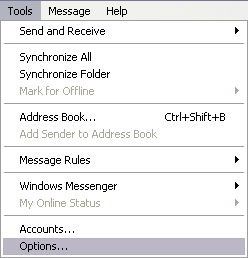
1) In Outlook Express, go to the Tools menu at the top.
2) Click on Options


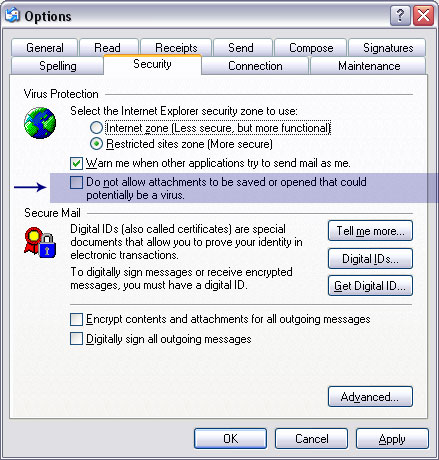
3) A new Window will appear. Click on the Security Tab (screenshot)
4) On the security screen there is check mark by a line that says “Do not allow attachments to be….” This line is about 1/3 of the way down. Remove the check mark.
5) Click OK

2011-10-25T19:47:11-05:00May 30, 2010|FAQ|Comments Off on I have XP or I upgraded to Outlook Express 6 and now I can’t receive attachments. What’s up?

Why does my password keep changing?

It is not actually changing your password. It is just showing more “dots” than your password has characters. In older versions of Windows, if you had a 5 letter password, it would show 5 starts or dots. Since this allows someone to get closer to guessing your password because they know how long it is, they added a new feature to XP so that it just shows a bunch of dots every time. All subsequent versions of Windows also have this feature. That way, it doesn’t give a hint as to how long your password really is.

2011-10-25T19:47:22-05:00May 30, 2010|FAQ|Comments Off on Why does my password keep changing?

Email Settings

Customers of Network Solutions, LLC. at https://www.networksolutions.com, these are NOT your settings!

Our web-based email interface can be found on our home page or by going to https://webmail.internetpro.net

The web-based interface will allow you to choose one of three webmail clients (Tuxedo, New Tuxedo or Webmail Lite).  It will also allow you to change your email settings such as whitelists, blacklists, autoresponders, and password changes. Otherwise, please use the settings below to set up an email client (Outlook, Windows Mail, Thunderbird, Apple Mail, etc – we recommend using an email client instead of webmail).

Basic Email Settings

Incoming mail server name (host name): imap.internetpro.net
Incoming mail server port: 143 using STARTTLS
* If no STARTTLS, 993 using SSL

Outgoing mail server name (host name):  smtp.internetpro.net
Outgoing mail server port: 587 using STARTTLS
* If no STARTTLS, 465 using SSL

Incoming mail server is an IMAP server.
Outgoing server requires authentication (use same settings as my incoming mail server) – *do not select ‘Require logon using secure password authentication (SPA)’
User name or account name is entire email address (e.g. support@internetpro.net instead of just support)

iPhone/iOS Users please note:
Apple lists the outgoing server username and password as Optional, but they are NOT optional and must be filled out with the same information as the incoming server, including full email address as username and the corresponding password.

Additional Email Settings
Our email servers also handle POP if you prefer (not generally recommended):

Incoming mail server name: pop.internetpro.net
Incoming mail server port: 110 using STARTTLS
* If no STARTTLS,
995 using SSL

Some email clients may have SSL/TLS as an option rather than STARTTLS.  If that is the case, use the SSL ports below:

POP3 via SSL on Port 995
IMAP via SSL on Port 993
SMTP via SSL on Port 465

SPAM
Click this link for detailed spam filtering instructions including personal server-side whitelisting and blacklisting.

2024-04-25T14:54:16-05:00May 30, 2010|Documentation, FAQ|Comments Off on Email Settings
Go to Top